







✔️ 4.9 ★★★★★ | 750+ verified reviews | See all shop reviews
Faraday Pouch Manual
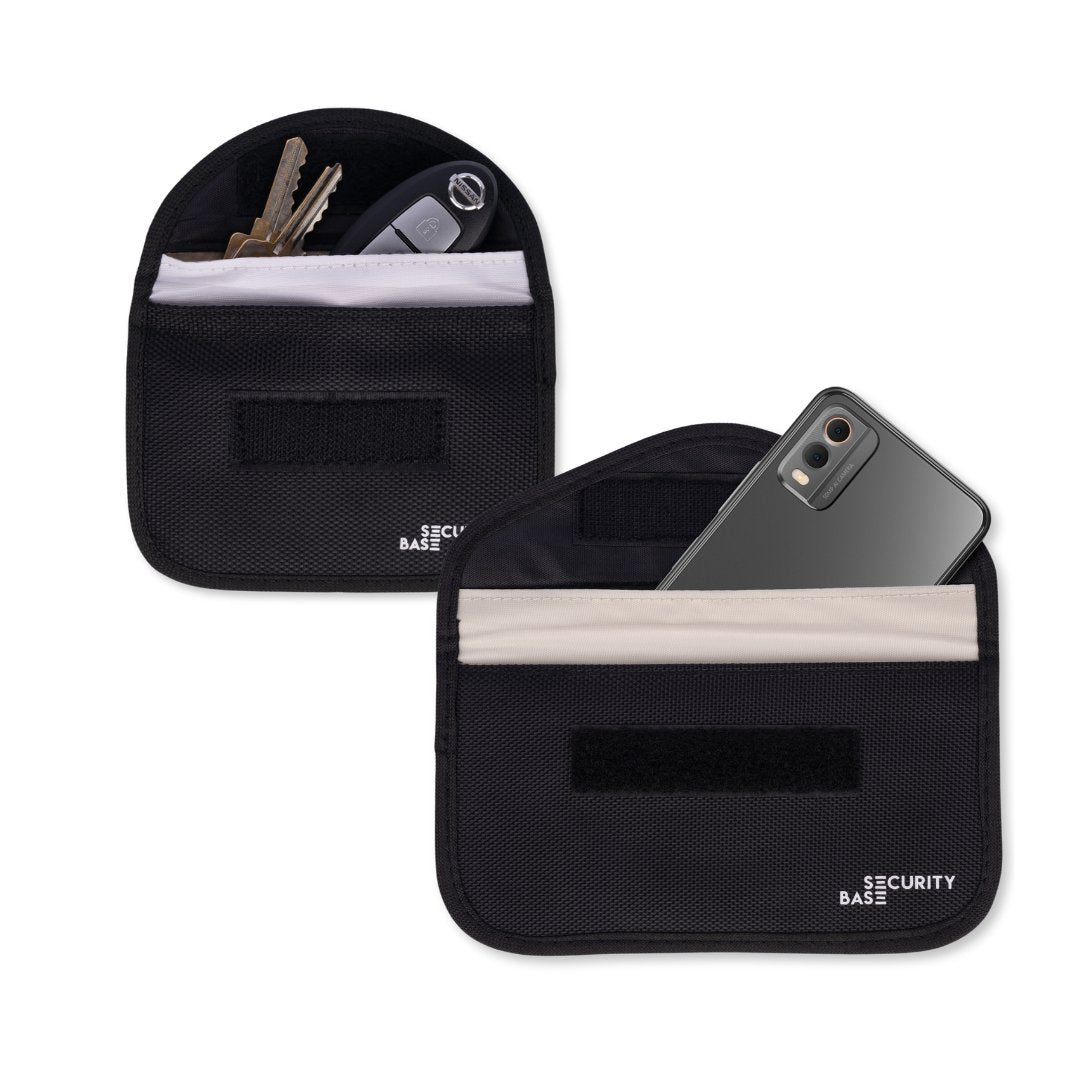
SecurityBase Faraday Pouches are designed to block wireless signals. This includes phone signals, Bluetooth, Wi-Fi, GPS, RFID/NFC and car key signals, depending on the device being placed inside.
Our bags provide this superior signal blocking through:
- Double-layer Faraday material – most other brands use only a single layer
- 2 cm fold-over seal – compared to the 1 cm fold found on many alternatives
- Conductive stitching – ensures uninterrupted shielding (unlike non-conductive stitching)
- Secure Velcro closure – avoids the signal leakage risks of buttons or magnets
If you are experiencing issues, please check the common causes below:
1. Use the correct compartment
Our Faraday pouches include an outer pocket for coins, house keys or other items that don't require protection. This pocket is for general storage only and does not block signals.
✅ Always place your phone, car key, or card inside the main inner compartment, which has the double Faraday lining.

2. Make sure the pouch closes properly
For the pouch to work correctly, the phone, key fob or other device must fit fully inside the lined compartment, with the flap folded over securely and the Velcro fully closed.
If the content is too bulky, the pouch may not seal properly. For car key pouches, please check that a bulky key set is not preventing the pouch from closing correctly. In that case, a larger Faraday pouch may be needed.
✅ Choose the correct size bag or pouch for your device; we offer phone, car key, and larger pouches to ensure a comfortable fit and enable a secure seal. You can find our range of Faraday Bags with various sizes (incl. larger pouches) here.

3. Do not place sharp items in the pouch
SecurityBase’s Faraday material is designed to provide excellent signal-blocking performance, but the inner lining can be damaged by sharp items. Even small punctures or tears may reduce effectiveness over time.
⚠️ Do not place sharp items, including sharp-edged keys, inside the inner lining. Sharp items can cause additional wear and tear and degrade pouch performance. Place any additional keys outside the pouch and secure them using the key chain.
4. Wait before testing
Some phone activity can continue briefly after the signal has been blocked. For example, music, videos, emails or notifications may still appear if the content was already buffered or received before the phone was placed inside the pouch. This does not mean the pouch has failed, only that your phone is still processing information it received earlier.
✅ For the most accurate test, wait around 20-30 seconds after sealing the pouch before checking.
How to Test a Phone Faraday Pouch
- Place your phone fully inside the main inner compartment.
- Fold and close the Velcro flap securely.
- Wait 15–20 seconds.
- Call the phone from another device.
If the pouch is sealed properly, the call should not come through until the phone is removed from the pouch.
How to Test a Car Key Faraday Pouch
- Place your car key or key fob inside the main inner compartment.
- Fold and seal the Velcro flap securely.
- Walk up to your car and try to unlock it.
If the pouch is sealed properly, the car should not unlock while the key is inside the sealed pouch.
Troubleshooting
If signals still appear to come through, please check the following:
- The device is inside the main lined compartment, not the outer pocket.
- The device fits fully inside the pouch.
- The Velcro closure is folded over and sealed properly.
- You waited 20-30 seconds before testing.
- For phones, any notifications were not simply delayed or already loaded before the phone was sealed inside.
How long does the pouch last?
A Faraday pouch is designed to provide long-term protection, and the shielding material does not expire. However, its effectiveness can gradually decline due to normal wear and tear.
How long a pouch lasts depends largely on how often it is used. A car key pouch that is opened, closed, and handled every day may begin to lose effectiveness after about 3–6 months, even with high-quality dual-layer shielding like ours. In comparison, a larger Faraday pouch used only occasionally, such as during travel, can stay effective for many years.
The conductive shielding layer consists of a delicate nickel-copper mesh woven into fabric. It can be damaged by repeated folding, creasing, stretching, or abrasion, particularly when sharp objects, such as house keys, are placed inside the pouch.
To maintain reliable shielding, handle the pouch carefully, avoid excessive bending and test it periodically to confirm that it is still blocking signals effectively.
For more detail, see the article: How long does a Faraday Pouch last?
We're here to help!
Faraday Bags from SecurityBase are thoroughly tested and proven to work. Issues usually come down to placement or fit. By using the correct compartment and ensuring your device fits properly, you’ll get the full signal-blocking protection the bag is designed for.
Still having issues or questions? Feel free to reach out, and we're happy to assist!